Lesson 8 of 12
Chords
In VS Code, in an empty .lys file: type lesson, press Ctrl+Space and pick lesson-08-chords.
A chord row: symbols as printed (C Am G7 F#m Bb), no lengths — the chords in a bar share it. The row prints above the staff.
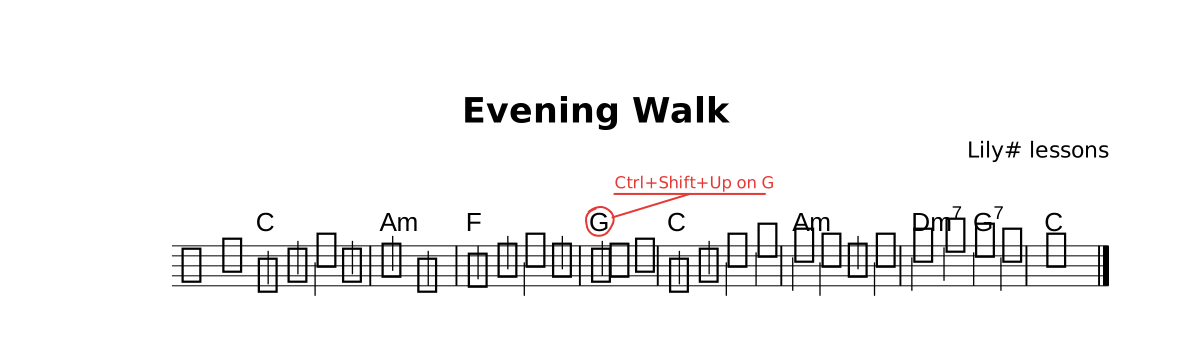
The lesson as it opens: the red rings mark where a step happens.
Try
Do what the red circle says — a guitar diagram appears · Ctrl+Space inside the chord row · add layout { chordDiagrams all } at the top.
The whole lesson
// Lesson 8 of 12 — Chords
// Preview: Ctrl+K V
//
// A chord row: symbols as printed (C Am G7 F#m Bb), no lengths —
// the chords in a bar share it. The row prints above the staff.

title "Evening Walk"
composer "Lily# lessons"

part melody {
  clef treble
  section A {
    e4 g c g | a2 e | f4 a c a | g2. r4 |
    e4 g c e | d c a c | d f e d | c1 |.
  }
}

chords prog {
  section A {
    C | Am | F | G@todo("Ctrl+Shift+Up on G") |
    C | Am | Dm7 G7 | C |.
  }
}

form { ~A }

score {
  chords prog
  staff melody
}

// TRY: do what the red circle says — a guitar diagram appears ·
// Ctrl+Space inside the chord row · add `layout { chordDiagrams all }` at the top.
//
// NEXT — type `lesson` on a new line and pick `lesson-09-piano`.