01
Parts
A part is declared once and carries what stays true for it. Attributes are written
bare, with no =.
part melody { clef treble }
part bass   { clef bass octave 3 }
part gtr    { clef treble_8 tuning guitar }
part fl     { clef treble instrument flute }
part cl     { instrument clarinet "Clarinet in Bb" }
part sing   { clef treble transpose d }
| Attribute | Takes |
|---|---|
clef | treble bass alto tenor treble_8 treble^8 bass_8 soprano mezzosoprano baritone percussion. A clef only draws the staff — it never changes which octave a bare letter means; that is octave's job, or the instrument preset's. |
octave | absolute, or a number that re-anchors the base (octave 3 for a low part) |
key | this part's own key signature (time and tempo are shared by every part, so they are written at the top level or in a section header) |
instrument | a preset name, a quoted display label, or both — see below |
transpose | a pitch, not a number of steps: it renames c to that pitch and moves every written note with it. This moves the PAGE — for a transposing instrument, name the preset instead. Writing a number is an error that says so. |
transposition | an octave marker — 8va 8vb 15ma 15mb. A different thing from transpose, and it does not take a pitch. |
pitch | concert or written — this part's convention for a transposing instrument, overriding the top-level pitch. Without a transposing instrument it changes nothing. See Transposing instruments. |
tuning | a tuning name; makes the part tablature-capable |
midiInstrument | a quoted General MIDI sound, midiInstrument "acoustic bass" — what playback sounds like, overriding the preset's |
pedal | text ("Ped. … *"), bracket (the default) or mixed — how this part's pedal marks are drawn |
A part may be named almost any word — part bass, part p,
part percussion, part c all compile. Only the structural keywords
are refused: the words that open a block of their own (voice,
staff, section, grace, …), the section settings
(key, time, tempo, …) and the form's own words
(segno, break, …); the error lists them. A section is named by
the same rule.
instrument — one word, several answers
Naming an instrument is not just a label. The preset settles everything a part needs to know about itself, and each of those can still be overridden by writing it explicitly:
| It sets | Which shows up as |
|---|---|
| the clef | viola reads alto, cello and bass read bass, guitar reads treble_8 |
| the octave anchor | where a relative part's bare letters land |
| the tuning | which strings a tab row has — hence the fret numbers |
| the MIDI program | what playback sounds like |
| the sounding octave | the bass family sounds an octave below its notation, a piccolo an octave above |
| the printed name | the label beside the staff — alto-sax prints “Alto Saxophone”, cello “Cello” — when the score has two or more instruments |
part gt { instrument guitar }                  // preset: clef, tuning, sound, label
part bs { instrument bass "Bass" }             // preset, with the label overridden
part v1 { clef treble instrument "1st Violin" } // label only — no preset behaviour
A bare word is the preset; a quoted string is the display label; both together set the preset and rename it. A quoted string alone is a free-text name and carries no preset behaviour — the clef and the rest come from whatever else the header says.
A preset's name prints as a part name does by default: only beside another instrument,
never on a score of one staff. A grand staff is one instrument — the piano's two hands
print “Piano” once, across the brace — while each staff of a staffGroup or
choirStaff is its own. A bare name is the common member of its family
(“Clarinet” is the B♭ one); the others name their key (“Clarinet in A”). A label you
write yourself — instrument bass "Bass", part bs "Bass",
staff bs "Bass" — prints wherever the staff stands.
Transposing instruments
Write what the player reads, and the preset makes it sound right. Naming a transposing instrument is enough — the part prints exactly the notes you typed, and playback (and a tab's frets, which read the same one value) shifts to where the instrument really is. A part cannot print at one pitch and play at an unrelated one.
| Preset | Written C sounds |
|---|---|
clarinet trumpet soprano-sax | B♭ — a major 2nd down |
clarinet-a | A — a minor 3rd down |
horn | F — a perfect 5th down |
alto-sax | E♭ — a major 6th down |
tenor-sax | B♭ — a major 9th down |
baritone-sax | E♭ — an octave and a major 6th down |
bass and its family | an octave down |
piccolo | an octave up |
trumpet-c flute oboe trombone … | as written |
A bare name takes the common member of its family — clarinet and
trumpet are the B♭ ones, horn is in F — because that is the
instrument someone means when they say no more. The others have their own spellings.
Every saxophone needs one (alto-sax, not alto): the plain
voice-range words are already the choral presets. Guitar and vocal tenor carry their
octave on the treble_8 clef instead of here, which is why their parts print
the little 8 under the clef and this table does not list them.
Or write what sounds, and print the players' parts transposed. A top-level
pitch concert says the notes are typed as they sound: they play as written,
and the file's scores print them so — a sounding score. On a score, pitch says
how that page prints, in a page's own two words: score sax pitch transposed
{ staff sx } prints the saxophone the way its player reads it, pitches and key
signature together — an alto-sax part of a piece in C major prints its
c' as a', in A major, and still plays C — and score full
pitch concert { … } prints a file written the first way at concert pitch, the
conductor's score. One staff can say it for itself: score { staff sx as pitch
transposed staff pno } is a sounding score with the saxophone in its player's key.
A score that says neither prints each part as its notes are typed. Where notes are typed
the words are written (the default, the first convention above) and
concert; where a page prints, transposed and concert —
each place refuses the other's word. Octave-only instruments (bass,
piccolo, a transposition 8vb) keep their notation under both, as
a printed concert score keeps them.
An explicit transpose is a different thing: it moves the
written notes by hand. Its argument is a PITCH, not a number of steps — it renames
c to that pitch and shifts every note by the same interval, so
part cl { clef treble transpose bes } prints c d e f as
B♭ C D E♭ — and it composes with the instrument's own shift. On a score it prints that
score in another key, the file unchanged: score low transpose bes, { … } is the
same music a step down (the comma counts — bes alone is a seventh up). Do not
confuse it with
transposition, which takes an octave marker
(8va / 8vb / 15ma / 15mb) and overrides
the preset's written-to-sounding octave.
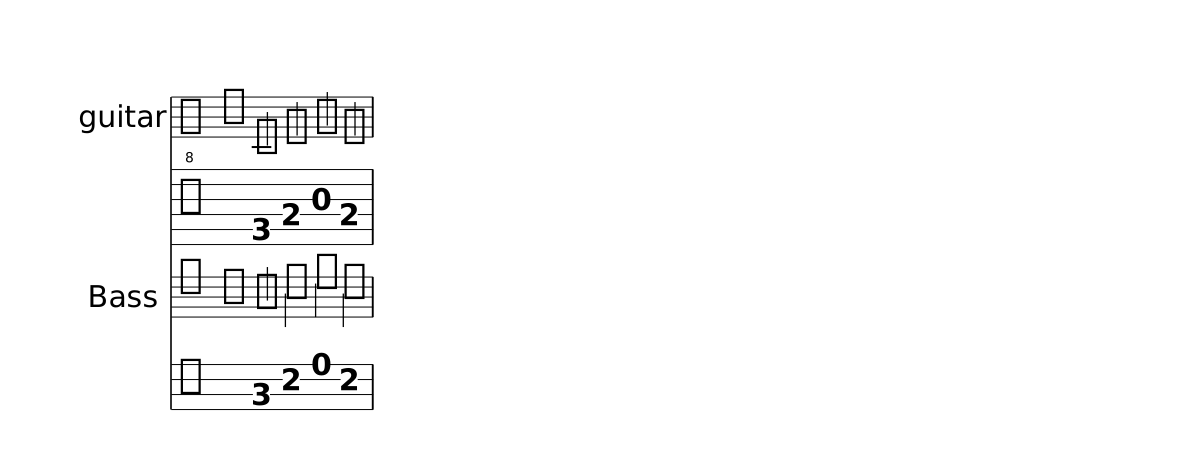
Show the whole file
// One word sets several things at once: each part's clef, the octave its bare letters
// anchor to, its tuning (so its frets), what it sounds, and its printed name. Neither
// part below says `clef`, `octave` or `tuning` — the preset already did, which is why the
// same letters land at C4 on the guitar and at C3 on the bass.
time 4/4
part gt { instrument guitar }
part bs { instrument bass "Bass" }
section A {
  gt { c4 e g e | }
  bs { c4 e g e | }
}
form { ~A }
score {
  staff gt  tab gt
  staff bs  tab bs
}
Drums
clef percussion makes a drum part: it writes drum names where a part writes
pitches, draws no key signature, and plays on the General MIDI drum channel. A kit is
written as patterns — each a one-bar phrase — that drums { } plays
together and draws as drummers read: the hands on stems up, the feet (bd,
hhp) on stems down.
phrase hats   { hh8 8 8 8 8 8 8 8 | }
phrase back   { r4 sn r sn | }
phrase kick   { bd4 r8 bd bd4 r | }
phrase groove { drums { hats back kick } }

part kit { clef percussion }
section Groove {
  kit { groove groove groove drums { { hh8 hh hh hh hh hh hho hhc | } back kick } }
}
form { ~Groove }
score { staff kit }
Each line of a chart is a phrase name or { … }, led by up or
down to choose its side; a line holds drum notes, drum chords, rests,
tuplet and repeat. A note written straight in the chart is an error
(LYS0040); three hands, three feet, or the hi-hat open and closed at once warns (LYS4030).
In the editor, Ctrl+Space in a drum part offers your phrases first, then fourteen
stock one-bar patterns — hats8 hats16 hats4 hatsOpen shuffle back halfTime ghost flam
fourFloor kick8 kickSync fillToms fillTriplet — whose phrase declaration
it writes into the file, then the drum names. Hovering a phrase's name shows its beat as a
grid, one row per drum. A ghost note is sn16@parenthesize, a flam
acciaccatura { sn16 } sn4. Two voices, voice { hh8 … } { bd4 … },
still write a kit too.
The names are LilyPond's: bd bass drum, sn snare,
ss side stick, hh hi-hat (hho open and
hhc closed draw their ○ and + by themselves, hhp the pedal),
tomh tommh tomml toml tomfh tomfl the toms from high to low,
cymc crash, cymr ride, rb ride bell,
cyms splash, cb cowbell, tamb tambourine — and the
long names (bassdrum, snare) as well. Ctrl+Space in a
drum part lists them all. Durations, rests, chords (<bd hh>4),
repeat and marks work as they do on notes.
A top-level drummap { hh: position 6 notehead x } re-tables a drum: its
staff position (−9 to 9, 0 the middle line), its notehead (x cross diamond triangle
slash xcircle default), its sound (midi 44) or its mark (mark
open, stopped, staccato, tenuto). It changes
the drums there are; it cannot add one. The LilyPond export keeps LilyPond's own table, and
says so.
02
Phrases
Named music, declared with phrase and used by its bare name:
phrase motif { c4 d e f | }
section Main { melody { motif g2 g | } }
Each phrase body evaluates in a fresh frame — default octave, pitch and duration are reset — so a phrase means the same notes at every call. A reference is one item to the relative chain, exactly like a chord: the next note is relative to the phrase's anchor (its first note's bare letter, shifted by the reference's marks), never to how the body happens to end.
A trailing ' or , on a reference shifts that play's octave.
There is no per-reference transposition: a motif quoted at another interval is written
out, because transpose is a property of a part, not of a quotation.
A phrase can be played by any part, as often as you like, and can play another phrase.
It is the same notes everywhere — the playing part's octave does not
move it — so a lower instrument quoting it shifts it with marks:
time 3/4
part violin { clef treble }
part cello  { clef bass }

phrase turn { e'8 d c d e4 }    // one bar
phrase answer { turn | g2. }        // two bars: a phrase can play another

section A {
  violin { turn | answer | c'2. | }
  cello  { c,2. | c2. | g2. | c2. | }
}
section B {
  violin { g'2. | g2. | e2. | c2. | }
  cello  { turn,, | turn,, | g2. | c2. | }   // two octaves down: the same bar, in the cello's range
}
form { A B }
score { staff violin  staff cello }
- Names. A phrase is played by its bare name, so it cannot be named for a word
the music already reads as something else: a keyword, the note
f,q,chordor a drum name (LYS1030). The clef words and the dynamics words (bass,p,mf, …) are fine. - Drum patterns. In a drum part, Ctrl+Space offers the standard
patterns by name; picking one writes its
phrasefor you, ready to edit (Drums). - In the editor. Hovering a phrase's name shows its length, how often the file plays it and its source (a drum phrase as a grid, a row per drum); Rename renames every reference; and Extract Phrase from Section turns bars you have written into a phrase.
03
Sections
A section binds music to each part by name, and is the unit the form
orders. Section boundaries reset the relative frame.
Same section name, same time. Everything written under one name — each part's music, a chord row, a lyrics track — plays at once, over the same bars; a section with another name comes when the form plays it. So a section's parts should be the same length: when they are not, the editor warns and names the length each one writes.
section Verse {
  partial 8                       // optional pickup, for every part at once
  melody { a'8 | c4 d8 e8. f16 e8 |  }
  bass   { r8  | a4 e8 a4. |  }
  chords prog  { | Am | }         // a chord row lives here too (the pickup holds none)
  lyrics words sings melody { A- | las my love you do | }
}
A section prints a rehearsal label by default. ~ on a form reference hides
it for that play (form { ~Verse Chorus }). The tilde belongs to the
reference only — section ~A { … } is an error.
The label is the section's name unless a string says otherwise. Text with spaces or a
' is written once on the section's top-level declaration — in a file grouped by
part its body may be empty — and every play prints it; a form reference's own
"Label" still wins, and ~ still hides it:
section A2 "A'" { }
part p1 { section A2 { c d e r } }
part p2 { section A2 { e f g r } }
form { A2 }                     // prints A'
Only a top-level section takes a label: one inside a part or a lyrics / chords track is an error, since every part plays the same section.
A section may state its own key, time, tempo or
partial at the top of its body; they apply to every part of that section, and
key and meter revert at the next one (the tempo carries on). Those four are the whole list:
a setting of one part — clef, octave, instrument,
transpose — belongs on the part, or (a clef) in the music where it changes.
section B {
  key g major
  time 3/4
  melody { g4 a b | }
}
A key, time or clef that changes nothing draws
nothing. At a section's start it is compared with what the section before it left in
force, so a section that continues in the same key prints no second signature. To draw one
anyway — a courtesy key at a new movement, a clef restated after a long rest — write
! right after the keyword: key! ees major, time! 3/4,
clef! bass. After the value, ! is the dashed barline.
Grouped by section, or by part
The examples on this page are grouped by section: each section lists the music of every part. A long score is often easier to write by part, each part holding its own sections — the same music, the other way round. A standalone section header then carries the section's key, meter or tempo for all parts:
part melody { section A { c4 c g' g | } }
part bass   { section A { c2 e | } }
section A { key g major }       // applies to every part playing A
form { A }
score { staff melody  staff bass }
In that grouping a chord row or a lyrics track names its sections inside it
(chords prog { section A { C | } }). The editor's Regroup command
rewrites a file from one grouping to the other, and Split Sections to Match a Part
keeps parts that cut a section differently in step — see the
editor page.
04
Lyrics
sings binds a lyric track to the part it sings. It is a property of the
track, not of one place in the file, so it may be spelled at the definition, on the
score row, or both — the same one property, written wherever it reads best.
// on the definition
lyrics words sings melody { Hap- py birth- day | to you | }
score { staff melody  lyrics words }

// or on the score row, leaving the definition bare
lyrics words { Hap- py birth- day | to you | }
score { staff melody  lyrics words sings melody }
Spelling it on the row is what lets ONE track serve several staves. Place the
same lyrics row under each staff and bind it there — the words are written
once and appear under every voice that sings them, which is what a homophonic chorale
wants:
score {
  staff sop "Soprano"
  lyrics verse sings sop
  staff alt "Alto"
  lyrics verse sings alt
}
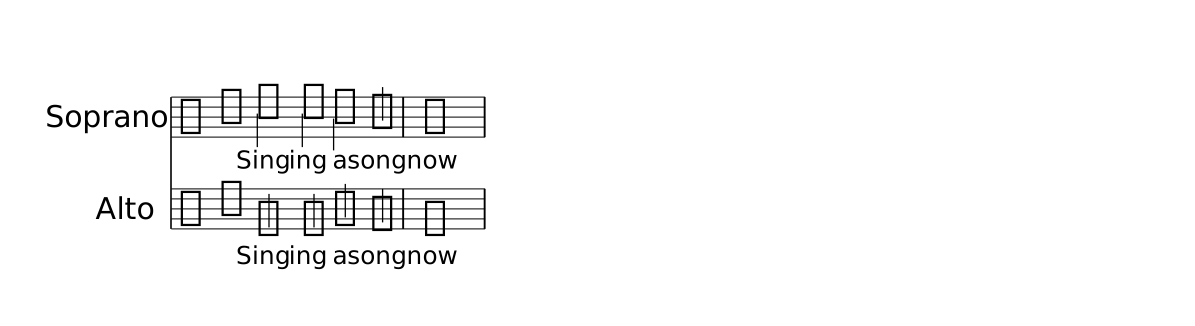
Show the whole file
// `sings` is a property of the lyric TRACK, and it can be spelled at either site:
// on the definition, on the score row, or both. Spelling it on the ROW is what lets
// ONE set of words serve several staves — here the same track is placed twice.
time 4/4
key c major
part sop { clef treble }
part alt { clef treble }
section A {
  sop { c'4 c b a | g1 | }
  alt { e4 e g f | e1 | }
  lyrics verse { Sing- ing a song | now | }
}
form { ~A }
score {
  staff sop "Soprano"
  lyrics verse sings sop
  staff alt "Alto"
  lyrics verse sings alt
}| Written | Means |
|---|---|
| space | next syllable |
- | joins syllables of one word |
~ or _ | hold the previous syllable over one more note (a ~ glued on both sides, va~ga, puts two syllables on one note) |
__ | draw the extender line; takes no note |
| | mirrors the music's barlines |
A slur or a tie holds its syllable, as in LilyPond. The notes inside a slur
(after its first) and a note a tie arrives at take no syllable of their own, so
c4( d e) f sung to la __ lu puts lu on
f. A slur written only to mark phrasing over a lyric line would swallow its
syllables — write that one as @phrasingSlur … @!phrasingSlur, which holds
none; the warning says so when it happens.
Verses — different words for each pass of a section — are written with a verse
header, [1. … ]. The number names the pass and prints as the stanza number; a
list or range covers several ([1,3. …], [1-2. …]) and
[~1. …] keeps the words but hides the number. Under a |: B :|
repeat the section is printed once, so its verses stack under it:
part melody { clef treble }
section B {
  melody { g4 a b c | }
  lyrics words sings melody {
    [1. up up up up |]
    [2. down down down down |]
  }
}
form { |: B :| }
score { staff melody  lyrics words }
Barlines follow the same rule as music: every written | closes one bar,
the one that opens the run included. That leading | is how a verse
skips the rest bar its melody opens with.
The score places the row by order. A bound lyrics NAME row directly
below the staff engraving its part is that staff's verse, and a run of rows stacks as
verses. Elsewhere it shows only the words, at the melody's rhythm, without engraving the
melody. Several tracks may sing one part — two languages, two names. Inside a staff group
a row must sing the staff directly above it; write the binding at the row to say which.

Show the whole file
// A lyric track sings a part. '-' joins syllables of one word, '~' holds the previous
// syllable over one more note, and '|' mirrors the music's barlines.
time 4/4
key f major
part melody { clef treble }
section A {
  melody { f4 g a bes | c2 a4 f4 | g4 a bes a | f1 | }
  lyrics words sings melody {
    Sing- ing all the | day ~ long, |
    ev- ery word a | song |
  }
}
form { ~A }
score { staff melody  lyrics words }
05
Chords and chord rows
A chords NAME { … } row holds chord symbols as they print. Placed
directly above a staff, they align over it by timing; placed on their own, they draw a
staff-less grid of barlines.
chords prog { Cmaj7 | Am7 | Dm7 | G7 | F#m7-5 B7-9 | }
| Written | Means |
|---|---|
| one entry in a bar | takes the bar |
| two entries in 4/4 | halves; four, beats — entries divide the bar on the meter's beat grid |
. | hold the previous chord one more beat (never across a barline); at a bar's head, a slot with no chord (| . C |) |
r R | print “N.C.” in that slot |
| | | a bar with no chord at all |
C(x32010) | a chord that also draws its diagram — see Chords and chord diagrams |
There is no s in a chord row; it is refused with the spellings
above.
How a symbol is spelled
You type the symbol, not an encoding: Cmaj7, Am7,
G7sus4, C/G, Bb7/D, F#7. One rule is
worth knowing before it surprises you:
an altered tension takes + or −, never # or b
So a half-diminished chord is F#m7-5, a flat ninth is C7-9,
a sharp five is A7+5. The reason is that # and b
belong to the root and the bass — without that split, Bb9 could not
say whether it means B♭ with a ninth or B with a flat ninth. Written the other way
(F#m7b5) the suffix is not a quality Lily# knows: it prints as typed, but
carries no chord.
The registered qualities: m min dim aug 7 maj7 maj m7 min7 mmaj7 dim7 m7-5 +
6 m6 min6 9 maj9 m9 min9 sus2 sus4 sus 7sus4 7-5 7+5 7-9 7+9 7+11 add9 11 13 m11 min11
m13 min13 maj13. A quality outside that list still prints in a chord row —
the row keeps whatever suffix you wrote — but it has no interval set, so playback sounds
only its root and @chord on a note refuses it.
Entries carry no durations — the grid does the arithmetic. Barlines in the source are
drawn and follow the same bare-barline rule as music and lyrics. A |: in a
chord row is a repeat like any other and belongs in the form; the repeat barlines the form
composes still reach the row and draw there.
The same named row can be used twice — above a staff in one score, and as a standalone chart in another — so a progression is written once.
A row the score places also sounds. In the MIDI (and in the editor's playback)
it plays on a track of its own, NAME (chords), softer than the melody, each
symbol over exactly the span it prints over: . holds it, r is
silence. A symbol names a chord but voices none, so Lily# uses one voicing everywhere —
every tone between G3 and G4, a slash bass an octave below (G7/B sounds B2 G3
B3 D4 F4). A row no score places is silent.
What you write and what it prints are two different choices
A chord has three representations in Lily# — a symbol (Cmaj7), a
degree of the key (Imaj7), and the notes
(<c e g b>) — and the language keeps the one you type separate
from the one that prints. Both spellings resolve to the same structure, so
everything downstream — the printed name, the degree, playback, transposition — is one
road.
| You write | Score item | It prints |
|---|---|---|
chords prog { Cmaj7 } | chords prog | Cmaj7 |
chords prog { Cmaj7 } | chords prog as roman | Imaj7 |
chords prog { Imaj7 } | chords prog | Cmaj7 |
chords prog { Imaj7 } | chords prog as roman | Imaj7 |
<c e g>4@chord | staff … | C — derived from the notes |
c4@chord(Dm) | staff … | Dm — stated on the note |
So a chart written in degrees prints absolute names by default, and one written in
names prints degrees under as roman. A degree is read against the key in
force at that bar, which is why a modulation re-reads them rather than freezing them.
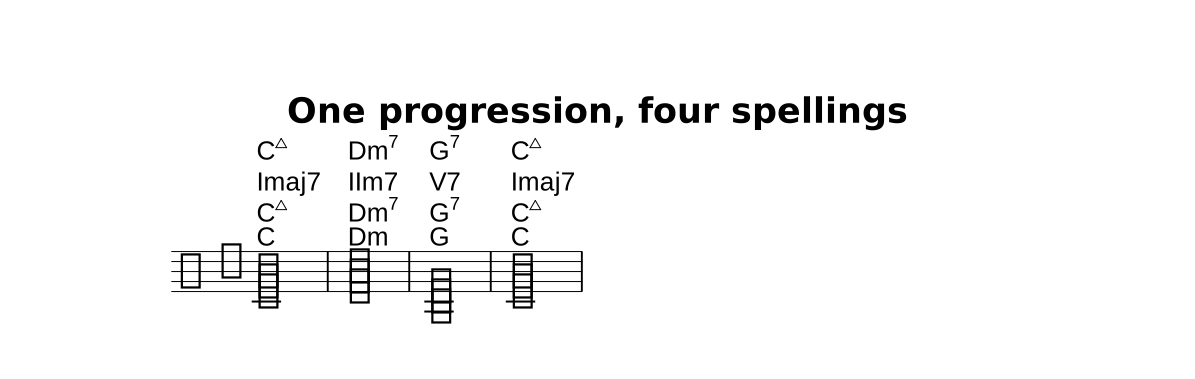
Show the whole file
// What you WRITE and what it PRINTS are independent axes.
// Row 1 and row 2 are the SAME chord part, printed two ways.
// Row 3 is written in degrees and prints as names — the default.
// The staff derives its symbols from the notes: <c e g>@chord prints "C".
title "One progression, four spellings"
time 4/4
key c major

part m { clef treble }

section A {
  m { <c e g>1@chord | <d f a>1@chord | <g b d>,1@chord | <c e g>1@chord | }
  chords byName  { Cmaj7 | Dm7 | G7 | Cmaj7 | }
  chords byRoman { Imaj7 | IIm7 | V7 | Imaj7 | }
}

form { ~A }

score {
  chords byName             // written as names, printed as names
  chords byName as roman    // the SAME row, printed as degrees
  chords byRoman            // written as degrees, printed as names
  staff m                   // the symbol derived from the notes
}
Rows one and two above are the same chords part,
placed twice in one score with different display. Row three is written in degrees. The
staff underneath carries no chord symbols of its own — each is derived from the notes by
a bare @chord.
The name a bare @chord derives
A bare @chord reads the symbol off the notes. The root comes from the
pitches, not from whichever member you typed first — the members are tried as the
root from the bass upward, and the first that names a registered quality wins. If that
root is not the lowest
sounding note, the chord is an inversion and the lowest note prints as the slash bass.
| Written | Sounds | Prints |
|---|---|---|
<c e g> | C4 E4 G4 | C |
<e g c> (absolute) | E4 G4 C4 | C — c is still the lowest |
<e g c> (relative) | E4 G4 C5 | C/E |
<e, g, c> (relative) | E3 G3 C5 | C/E |
The bass is tried first, and that is what keeps this safe. Some
sets read as more than one chord: <c e g a> is C6 from C and Am7 from A.
Preferring the bass settles it the way the voicing already suggests — C6 when c is at the
bottom, Am7 when a is — and it is why <c e g b> is Cmaj7 rather than
something rooted higher up. Another root is only ever consulted when the bass names
nothing at all.
Where the notes are genuinely ambiguous, say which you mean:
<e g, b d>@chord prints G6 (g is the bass), and
<e g, b d>@chord(Em7/G) prints Em7/G. Watch the octaves rather than the
written order — under octave absolute, <e g b d> puts d
below e and so reads Em7/D.
What completion offers
Inside a chords { } block, and inside a @chord(…) argument,
completion offers the current key's diatonic chords — each degree's triad and seventh (and,
among the names, the suspended forms) — read against the key in force at that point.
Hovering a chord symbol, or a chord or << >> in the music, shows
its name, its degree and its pitches (Dm (IIm) D4 F4 A4).
- In a
chords { }block you get both vocabularies: all seven degrees as names first (C D E F G A B …), then all seven as degrees (I II III …), so each list can be scanned on its own. - In a
@chord(…)argument you get the names only. The annotation reads the absolute-symbol grammar alone, so@chord(V7)is refused — the completion offers nothing it would then reject. - What it inserts is the symbol —
Dm7,Imaj7— not the notes. The entry format is the printed form, for a row and an annotation alike.
06
Forms — the playing order
A form lists sections in the order they are played and printed. This is
where repeats live, because a repeat is a change to the order.
form { Intro Main Main "Main (reprise)" Coda }   // three ways to write a form —
form { |: Body [1. ~First] :| [2. ~Second] }     // a file has ONE unnamed form
form { |: A :|*3 }                               // (a second is LYS1016)
form practice { Verse }        // a named form: a score plays it with `form practice`
| Written | Means |
|---|---|
|: … :| | repeat; without endings the body plays twice |
:|*N | an explicit play count, for a repeat without endings |
[1. Name] | a volta ending — the first stands just before the :|, each later one just after one. The ] ends it and hooks the bracket's right end down; it may be left off only right before a :| ([1. B C :|, hooked). An unclosed last ending is an error |
[2. Name -] | the same ending with a straight (open) right end |
[1-2. Name] [1,3. Name] [1,3,5. Name] | a range or a list of passes, as long as you like; the bracket prints them as LilyPond does (“1. 2.”, “1.–3.”, “1. 3.”) |
[1. B C]@voltaBracket(2) | how far this ending's bracket reaches — all, line or a number of bars — over the layout's voltaBracket; a bracket cut short always ends straight |
[1. B C] | an ending of several sections, played in order under one bracket |
~Name | hide that play's rehearsal label |
Name' Name, | shift that play's octave — one section quoted at two octaves is ~B ~B' |
"Label" | a custom printed label for that play |
With endings, the numbers are the passes. The repeat plays as many passes as the
highest number, and each pass plays the ending that names it: |: A [1-2. B] :| [3.
C] is A B A B A C. A pass no ending names, or two name, is an error, and so is a
count beside endings — |: A [1. B] :|*3 [2. C] is refused with the numbered
spelling. The passes are written with , or -; [1.3.
B], the printed points, is an error that names both.
An ending needs a repeat to be an ending of: written without one, no bracket is
drawn and a warning says the 1. prints nothing. And a repeat needs a body —
the music every pass plays: |: [1. B] :| [2. C] is an error.
Navigation marks
Signs (segno, coda) engrave at the start of the following
section; text directives (fine, to coda, dc,
ds, and dc al fine, ds al coda) engrave at the end
of the section just played.
form { A segno B to coda C ds al coda coda D } // the MIDI plays A B C B D
The MIDI follows the jump texts as a player reads them: dc goes back to
the beginning and ds to after the last segno; al fine
ends the piece at the first fine of the replay, al coda goes on
from the coda sign after the jump, and a bare dc /
ds goes on after the jump. On the replay a repeat plays once. A tie at the
end of a section is carried along the same route. A ds with no
segno before it is drawn and not followed, and a warning says so.
The marks are form-only: written in a section's music they are an error, like a repeat
barline there — the route is read off the form alone. A landmark that falls inside a
section is written by cutting the section there (~ hides the label). They are
landmarks, never note modifiers, so c4@segno is an error too.
The unnamed form { } is the file's default; a score plays another with a
form NAME item.

Show the whole file
// A repeat changes the playing ORDER, so it lives in the form, never in the music.
// The endings name sections; the bracket and the repeat dots are drawn from this.
time 3/4
key g major
part melody { clef treble }
section Body   { melody { d'4 g fis | g2. | } }
section First  { melody { a''2. | } }
section Second { melody { g''2.@fermata | } }
form { |: ~Body [1. ~First] :| [2. ~Second] }
score { staff melody }
07
Using other files
A long piece can be spread over several files. using "strings.lys" at the top
level brings in that file's declarations — its parts, phrases, sections — as if they were
written here, so one file can hold the form and the scores and others the music.
// song.lys
using "melody.lys"            // a path relative to this file's folder
using "parts/bass.lys"
form { Verse Chorus }
score { staff melody  staff bass }
- Only at the top level; inside a section or a score it is an error.
- A file is brought in once however many files name it, and files that name each other do not loop.
- A file that cannot be read is a warning, not an error: the rest still renders.
- The preview of the file that names them shows the whole piece. Commands that rewrite
every note (Convert Octaves) leave a file with
usingalone, since some of its notes are in another file.