01
Chord names
A chord name is typed the way it prints — C, Am,
Dm7, G7, Bb7/D, F#m7-5 (an altered
tension takes + or -, because # and b
belong to the root). There are two places to write one:
- A
chordsrow holds a progression. Placed directly above a staff in thescore, it aligns over that staff; entries carry no durations — one entry takes the bar, two in 4/4 take half each. @chord(NAME)puts a name on one note.
A name alone draws no diagram. That is the rule the rest of this page builds on: a diagram appears where you ask for one.

Show the whole file
// Chord names alone. A `chords` row placed directly above a staff aligns over it;
// `@chord(NAME)` puts a name on one note. Neither draws a diagram: a name is only a name.
time 4/4
part melody { clef treble }
section A {
  melody { e'4 d c d | e e e2 | d4 d e d | c1@chord(C) | }
  chords prog { C | Am | Dm7 G7 | | }
}
form { ~A }
score { chords prog  staff melody }
Spelling, the registered qualities, Roman degrees (Imaj7),
as roman and the name a bare @chord derives from its notes are in
the manual's Chords and chord rows.
02
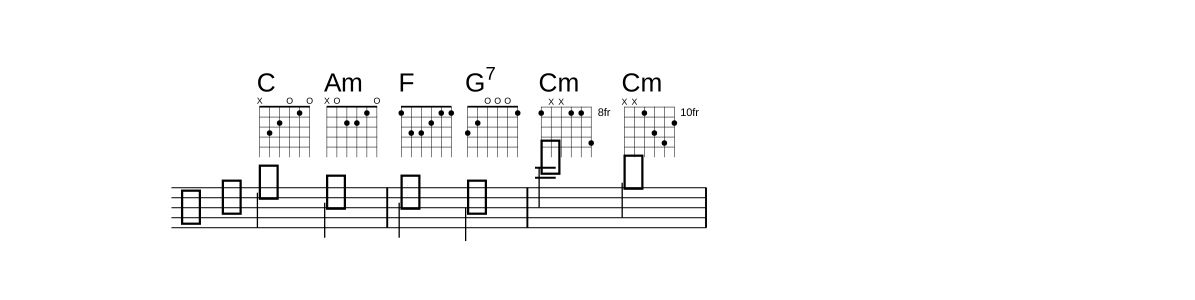
A shape draws a diagram
Write the chord's shape in parentheses after its name —
C(x32010) in a row — and a chord diagram is drawn under the name, between the
name and the staff. The bars widen to make room.
| In a shape | Means |
|---|---|
| one character per string | from the low string up: x32010 is low E muted, A at the 3rd fret, D at the 2nd, G open, B at the 1st, high E open |
x | a muted string — drawn as an X above the grid, as LilyPond draws it |
0 or o | an open string — drawn as an O above the grid |
| a digit | the fret. A shape that reaches past the 4th fret is drawn from its lowest fret, labelled 3fr, 8fr … as LilyPond draws it |
-10- … -15- | a two-digit fret, with a - on each side: 8xx88-11, xx-10-12-13-11. A - between every string reads the same (x-x-10-12-13-11), so a chord chart's spelling can be pasted in |
Show the whole file
// A shape in parentheses after a row's chord draws its diagram under the name. One
// character per string from the low string: x mutes the string, 0 (or o) leaves it open,
// a digit is the fret. Frets 10-15 take a '-' on each side: 8xx88-11, xx-10-12-13-11.
time 4/4
part melody { clef treble }
section A {
  melody { e'2 c2 | c2 b2 | c'2 g2 | }
  chords prog { C(x32010) Am(x02210) | F(133211) G7(320001) | Cm(8xx88-11) Cm(xx-10-12-13-11) | }
}
form { ~A }
score { chords prog  staff melody }
Between dashes, exactly two digits are one fret, so frets 10, 9, 9 are written
10-9-9 (10-99 would be fret 99, and warns). Shapes are lower
case, like every value word. A shape of the wrong length, a doubled or dangling
-, or a fret above 15 warns (LYS1038), naming the fix; the name still draws.
A shape is routed by its string count, so one chord can carry a shape for each
instrument that might draw it — F(133211 2010) is the guitar's six strings
and the ukulele's four. When two tunings have the same count, a tuning word names which
shape is whose: F(guitar 133211 guitardropd 333211).
A shape that no score of the file can draw warns too (LYS1038): G(xx543) is a
five-string shape, and in a file whose scores draw guitar diagrams it would draw nothing, so
the warning names the strings the scores draw. The same holds for a shape named for a tuning
no score uses.
A symbol in a chords row takes an @todo
like a note — Am7@todo("or C?") — and the preview rings it.
03
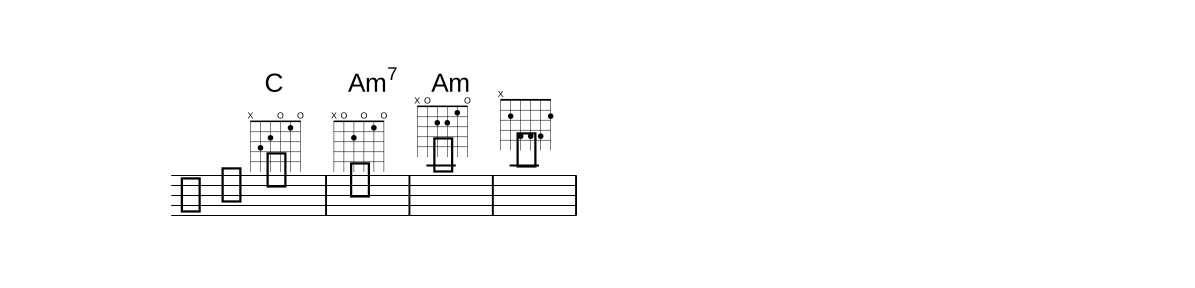
On a note, and with no name
On a note the shape follows the name, inside the parentheses:
@chord(C x32010). The words after the name are its shapes — which is why
@chord(C 7) is C with a (too short) shape, not C7: write
@chord(C7).
| Written | Draws |
|---|---|
@chord(C) | the name only |
@chord(C x32010) | the name and its diagram |
@chord(x02210) | the diagram, and a name read off the shape's notes (Am) |
@diagram(x24442) | a diagram with no name at all — not a chord symbol, so it always draws. .down puts it under the staff |
Show the whole file
// On a note, the shape follows the name inside @chord( ). A shape with no name names
// itself from its notes; @diagram draws a diagram with no name at all.
time 4/4
part melody { clef treble }
section A {
  melody { e'1@chord(C x32010) | c1@chord(Am7 x02010) | a'1@chord(x02210) | b1@diagram(x24442) | }
}
form { ~A }
score { staff melody }
04
The notes on the staff
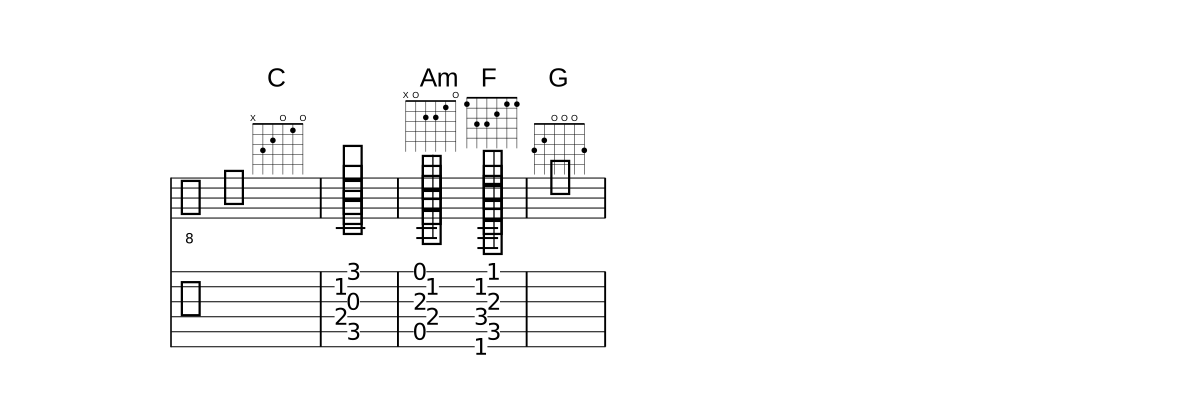
A diagram shows a shape; chord(NAME SHAPE) plays it. It is a music
item, written where a note or a <…> chord would be, and it writes each
sounding string as a note — the string's open pitch plus its fret, on the part's
instrument — with its string number, so a tab of the part shows exactly that
shape. chord(C x32013)1 on a guitar is C3 E3 G3 C4 G4 for a whole note.
- It takes what a chord takes after it: a duration, dots, ties, slurs, beams,
articulations, dynamics; a bare duration or
qrepeats it. - It draws no name of its own. A bare
@chordon it adds the item's name and diagram:chord(Am x02210)2@chord. - Its pitches are absolute — octave marks after the
)are an error; play it higher on the neck instead. The note after it reads its lowest note. - In
<< >>it is spread:<< chord(C x32010) >>2plays the five strings in turn, lowest first, under 5:4 — a written-out broken chord of a guitar shape — and mixed with other members (<< c chord(G 320003) e >>) its notes take their places in the sequence. - The shape is required:
chord(C)warns — write a shape: chord(C x32010) — and keeps its time as a spacer.
A chord name belongs to the beat, not to a note, so a rest, a spacer or a
full-measure rest takes one, diagram and all: s1@chord(C x32010) is an intro
bar over silence, r1@chord(G 320003) a rest bar that still names its chord.
(A bare @chord there has no notes to name, and says so: write the name.)
Show the whole file
// chord(NAME SHAPE) WRITES the shape's notes: each string's open pitch plus its fret,
// with its string number, so the tab shows the same shape. A bare @chord on it adds the
// name and the diagram. A chord name belongs to the beat, so a rest or a spacer takes one.
time 4/4
part gt { instrument guitar }
section A {
  gt {
    s1@chord(C x32010) | chord(C x32013)1 |
    chord(Am x02210)2@chord chord(F 133211)2@chord | r1@chord(G 320003) |
  }
}
form { ~A }
score { staff gt  tab gt }
String numbers, \N and the tab staff itself are in the
manual's Tablature.
05
Which instrument, and every chord
A diagram is drawn for one tuning. Which one is decided per score, strongest first:
- The score's layout:
layout { chordDiagrams ukulele }— any word a tab'stuningtakes (guitar,ukulele,mandolin,guitardropd,bass, …).chordDiagrams nonedraws no diagram at all, written shapes included. - Else the part's instrument, when it is fretted: for an
@chord, the part whose note carries it; for a row, the staff the row stands directly above. - Else the guitar — a lead-sheet row with no staff under it, or a staff that frets nothing.
So one source prints a guitar book, a ukulele book and a piano score, each from its own
score:
layout uke   { chordDiagrams ukulele }
layout piano { chordDiagrams none }
part melody { clef treble }
section A {
  melody { c'1@chord(C x32010) | }
  chords prog { F(guitar 133211 ukulele 2010) | }
}
form { A }
score         { chords prog  staff melody }               // guitar: C and F
score uke   { layout uke    chords prog  staff melody } // ukulele: F only
score piano { layout piano  chords prog  staff melody } // no diagrams
A shape the diagram's tuning cannot take (the guitar's six characters on a ukulele) is simply not used there.
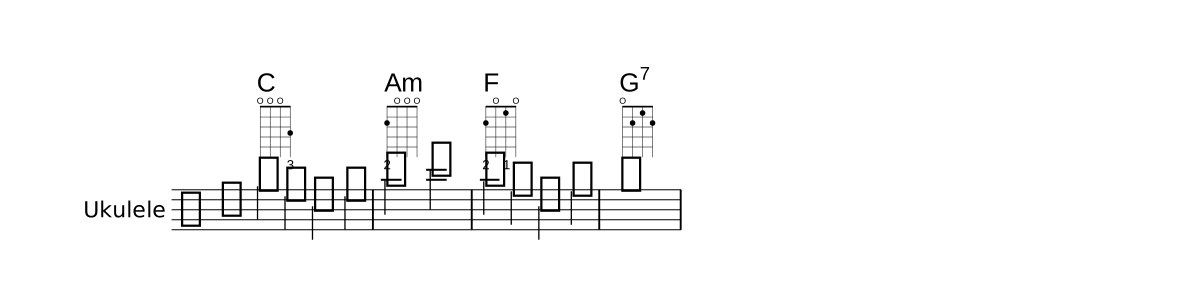
all — a diagram for every chord
Writing a shape on every chord of a song is tedious when the shapes are the usual ones.
The scope word all — after the tuning (chordDiagrams guitar all,
chordDiagrams ukulele all) or alone (chordDiagrams all, the tuning
then chosen as above) — makes every chord name in that score draw a diagram: the
shape written for its tuning, else its usual shape. The usual shape is LilyPond's
predefined one for that tuning (C x32010, F 133211; ukulele C
0003), else the first shape of Lily#'s own order. A chord with no shape at
all on the tuning warns once, asking you to write one.
Show the whole file
// `chordDiagrams all` draws a diagram for EVERY chord name: the shape written for the
// tuning, else its usual shape. The row stands above a ukulele staff, so the diagrams
// are the ukulele's - no layout word needed for that.
layout { chordDiagrams all }
time 4/4
part uke { instrument ukulele "Ukulele" }
section A {
  uke { g''4 e c e | a2 c | a4 f c f | g1 | }
  chords prog { C | Am | F | G7(0212) | }
}
form { ~A }
score { chords prog  staff uke }
G7 above carries a written shape, 0212, and draws it; the other
three draw the ukulele's usual shapes. Without all, only G7 would have a
diagram.
Lily#'s own order reaches the ukulele too. Its rules are the guitar's — chord tones only,
the required tones present, four frets, four fingers — less one: on a re-entrant tuning
(the ukulele's high G, a banjo's drone) the lowest string is not the lowest note, so "the
root is lowest" is not asked. With that, the order opens on LilyPond's own ukulele shape for
every chord tried, and a chord LilyPond's table lacks still has a usual shape
(Cmaj9 is 4203). A chord no rule can voice on four strings
(C13) has none, and warns.
Listed chords — a shape table
Between "only what is written" and "everything" sits a list. A table in braces after the
chordDiagrams words names the chords that draw a diagram wherever they are
named — in a row, in an @chord, in a bare @chord by the name
it derives — and the shape each draws, written as a row writes its shapes
(F 133211 2010, F guitar 133211 ukulele 2010); a name alone draws
the usual shape. A section NAME { … } block inside the table applies to the
chords written in that section, the rest to the whole song.
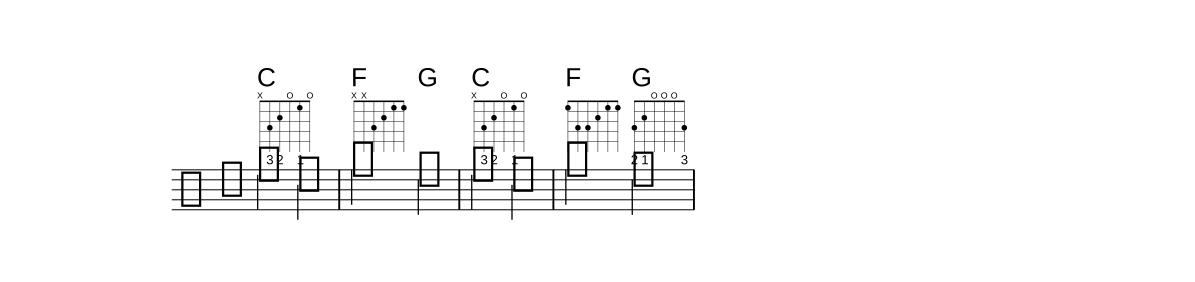
Show the whole file
// A shape table lists the chords that draw, wherever they are named. C draws its usual
// shape and F the listed xx3211 - except in the Chorus, where F is the barre and G draws too.
layout { chordDiagrams guitar { C  F xx3211  section Chorus { F 133211  G } } }
time 4/4
part melody { clef treble }
section Verse  { melody { e'2 c2 | f2 d2 | }  chords prog { C | F G | } }
section Chorus { melody { e'2 c2 | f2 d2 | }  chords prog { C | F G | } }
form { ~Verse ~Chorus }
score { chords prog  staff melody }
Strongest first: the shape written at the chord, the section's entry, the song's, then
— under all — the usual shape. The table follows all
(chordDiagrams all { F xx3211 }: the listed F, the usual shape for everything
else) or stands alone; none takes no table. A symbol that is no chord, a bad
shape and a chord listed twice (the last wins) are warnings and the rest of the table
stands; a section nothing declares warns.
06
A capo
layout { chordDiagrams guitar capo 3 } puts a capo on the third fret. The
music still writes the sounding chords — a row's Eb,
@chord(Eb) — and everything a player reads follows the capo:
- Every shape is the shape pressed above the capo.
Eb(x32010)is the C shape, and it is checked against the pressed chord (LYS1039); the usual shape of a chord is its pressed chord's, and the table's shapes are pressed shapes. - The printed name is the pressed chord's —
CforEb,GforBb— spelled in the key that many semitones below the key at the bar (in E major at capo 3 a soundingG#mprintsFm). A Roman degree is the sounding key's and is not moved. - "Capo 3" stands at the score's head, on the header's instrument line.
- A
chord(Eb x32010)item sounds three semitones higher — on the staff, in the MIDI and in the.lytwin.
What a name shows under the capo is layout { chordNames … }:
| Value | Prints, for a sounding E♭m7 at capo 3 |
|---|---|
shape (the default) | Cm7 — the chord the player presses |
sounding | E♭m7 — the chord that sounds |
both | E♭m7 (Cm7) — the sounding name, then the pressed one in parentheses, each with its own raised quality |
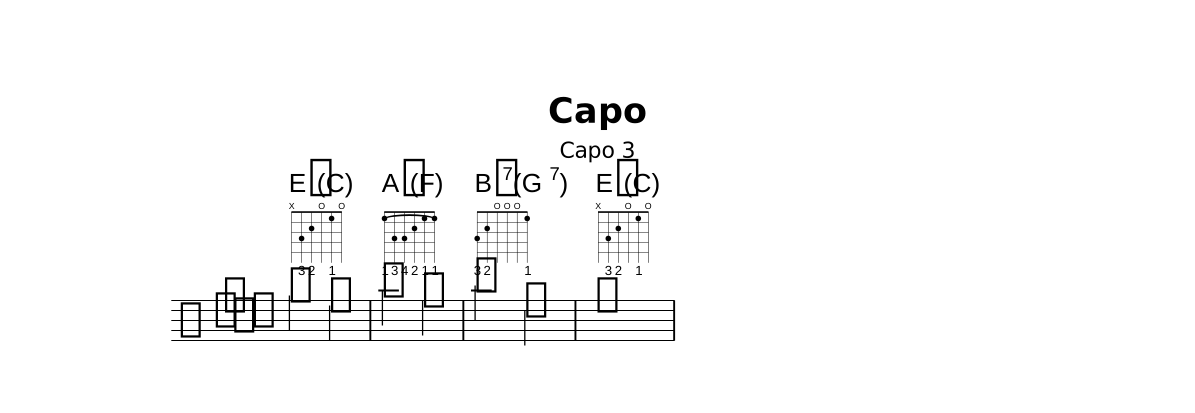
Show the whole file
// A capo on the third fret. The music writes the SOUNDING chords (Eb, Ab, Bb7); the page
// prints what the player presses (C, F, G7), draws the pressed shapes, and says "Capo 3"
// at the head. `chordNames both` prints both: the sounding name, then the pressed one.
layout { chordDiagrams guitar capo 3 all  chordNames both }
title "Capo"
time 4/4
key ees major
part melody { clef treble }
section A {
  melody { g''2 ees2 | aes2 f2 | bes2 d,2 | ees1 | }
  chords prog { Eb | Ab | Bb7 | Eb | }
}
form { ~A }
score { chords prog  staff melody }
The capo goes after the tuning word and before all
(chordDiagrams guitar capo 3 all); a fret is 1 to 11, and capo 0
is refused — leave the word out. Without a capo the three chordNames values
print the same name. The .ly twin writes the pressed chords and
instrument = "Capo 3", so LilyPond prints the same page (it cannot spell
both, and warns); MusicXML keeps the sounding chord in its
<harmony> and the pressed shape in its <frame>.
Which fret? In VS Code, after capo the completion ranks the
frets 0 to 7 by how many of the file's chords would need a barre there, fewest first
(capo 3: 0 barre chords of 3); hovering capo shows the same ranking.
You pick the fret and write it — there is no capo auto.
07
The chord list
A songbook page opens with the chords it uses. layout { chordList true }
draws that row at the score's head, under the title and above the first system: every chord
the score names — its chords rows and every @chord — once, in
order of first appearance, as the name the score prints (a capo's pressed name) over the
diagram it draws there.
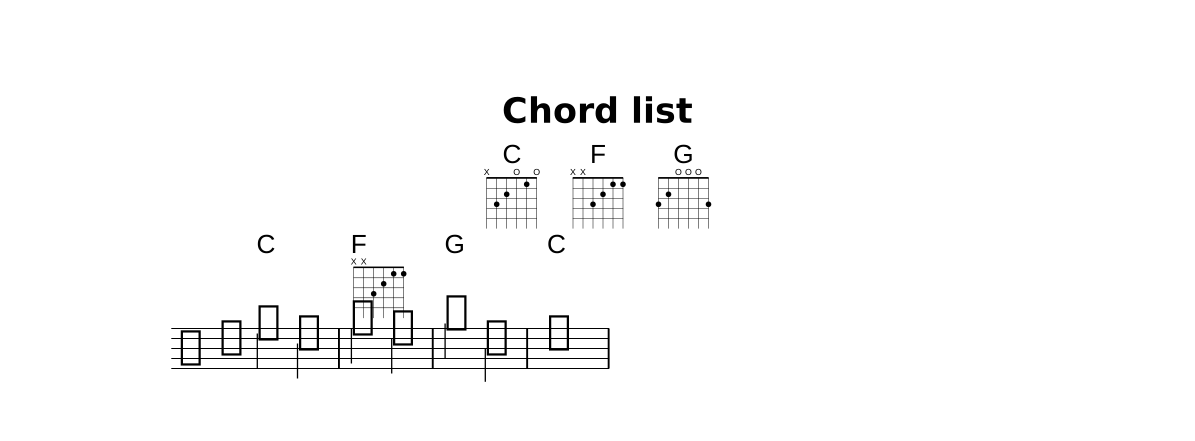
Show the whole file
// `chordList true` puts every chord the score names at its head, once each in order of
// first appearance, over the diagram it draws there - the songbook's "chords used" row.
layout { chordDiagrams guitar  chordList true }
title "Chord list"
time 4/4
part melody { clef treble }
section A {
  melody { e'2 c2 | f2 d2 | g2 b,2 | c1 | }
  chords prog { C | F(xx3211) | G | C | }
}
form { ~A }
score { chords prog  staff melody }
A chord that draws no diagram in the score still shows its usual shape in the list — the
list is where a shape is looked up — on the layout's tuning, else the guitar; under
chordDiagrams none the names stand alone. The cells fill the fewest rows that
fit the line, with as nearly equal counts as those rows allow (16 chords where 12 would fit
make two rows of 8), and each row is centred on the page. The .ly twin writes
the rows as \markup lines before the score.
08
When a shape is not the chord
A written shape is checked against the name it is written for (LYS1039, a warning — the shape still draws). Two things are asked: every note it sounds is a tone of the chord, and every tone the chord needs is there. The root and the perfect fifth may be left out; the 3rd, the 7th, an altered fifth and the tensions may not. The bass is not checked — an inversion is an ordinary shape.
c'2@chord(C x02210) c'2@chord(C7 x3201x) |
| Shape | The compiler says |
|---|---|
@chord(C x02210) | 'x02210' sounds A C E, which is Am, not C (A is not a tone of C) - write @chord(Am x02210) or another shape. |
@chord(C7 x3201x) | 'x3201x' for C7 lacks B♭ (the 7th) - fret B♭ or write another shape. |
A shape with no name (@chord(x32010)), an @diagram and a Roman
degree in a row are not checked. Nine of LilyPond's predefined shapes would fail this check
(guitar D♯m xx4341, Faug and Baug among them), so Lily# does not use them as
usual shapes.
09
Let the editor write the shapes
You rarely need to type a shape. In VS Code, put the caret on a chord — an
@chord(Cm7) or a row's Cm7 — and press Ctrl+Shift+Up:
its usual shape is written and the diagram appears. Press it again to walk through the
other playable shapes, each one sounded as you go; Ctrl+Shift+Down walks back,
and at the usual shape removes it again. Hovering a chord shows what it would draw — for
a listed chord, the table's shape (guitar: xx3211 (layout)) — and which of the order
it is (shape 2 of 39). It works on a ukulele part too. Hard stretch shapes are left
out unless you ask for them.
@chord(Cm7) writes its usual shape, then steps
through the others; Down at the usual shape removes it.The keys, the stepping order and the lilysharp.chordShapes.includeStretch
setting are on the editor page.