Lesson 6 of 12
Form and repeats
In VS Code, in an empty .lys file: type lesson, press Ctrl+Space and pick lesson-06-form.
Repeats go in the form, not in the notes:
|: … :| repeat · [1. X] first ending · [2. Y] second ending · ~X no label
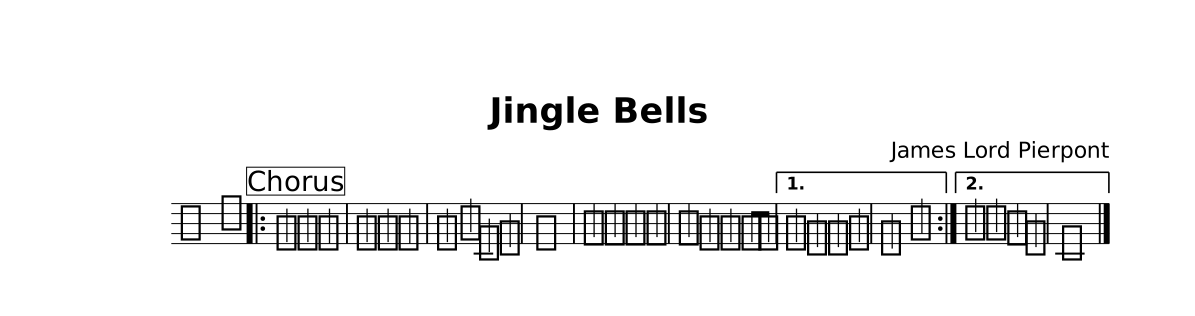
The lesson as it opens: the red rings mark where a step happens.
Try
Ctrl+Space inside the form · write form { |: Chorus First :|*3 Second }.
One section name = one stretch of time. Words, chords and other parts join the melody by writing the same name (lessons 7–10).
The whole lesson
// Lesson 6 of 12 — Form and repeats
// Preview: Ctrl+K V
//
// Repeats go in the form, not in the notes:
//   |: … :|  repeat · [1. X] first ending · [2. Y] second ending · ~X no label

title "Jingle Bells"
composer "James Lord Pierpont"

part melody {
  clef treble
  section Chorus {
    e4 e e2 | e4 e e2 | e4 g c, d | e1 |
    f4 f f f | f e e e8 e |
  }
  section First { e4 d d e | d2 g2 | }
  section Second { g'4 g f d | c1 |. }   // each section starts near middle C
}

form { |: Chorus [1. ~First] :| [2. ~Second] }

score { staff melody }

// One section name = one stretch of time. Words, chords and other parts
// join the melody by writing the same name (lessons 7–10).
//
// TRY: Ctrl+Space inside the form · write `form { |: Chorus First :|*3 Second }`.
//
// NEXT — type `lesson` on a new line and pick `lesson-07-lyrics`.