Lesson 5 of 12
Expression
In VS Code, in an empty .lys file: type lesson, press Ctrl+Space and pick lesson-05-expression.
Marks follow a note with @: @p @f @staccato @fermata … @cresc / @decresc run to the next dynamic. ( … ) = slur. Some marks need an end: @rit … @!rit.
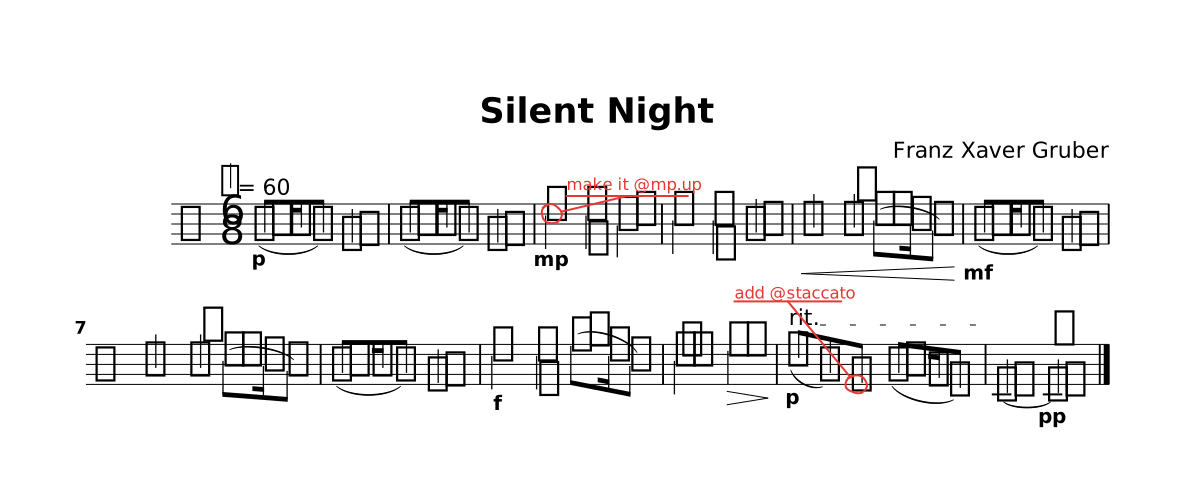
The lesson as it opens: the red rings mark where a step happens.
Try
Do what the red circles say · type @ after any note to see every mark.
The whole lesson
// Lesson 5 of 12 — Expression
// Preview: Ctrl+K V
//
// Marks follow a note with `@`: `@p` `@f` `@staccato` `@fermata` …
// `@cresc` / `@decresc` run to the next dynamic.  `( … )` = slur.
// Some marks need an end: `@rit` … `@!rit`.

title "Silent Night"
composer "Franz Xaver Gruber"

tempo 60
time 6/8

part melody {
  clef treble
  section A {
    g'8.@p( a16 g8) e4. | g8.( a16 g8) e4. |
    d'4@mp@todo("make it @mp.up") d8 b4. | c4 c8 g4. |
    a4@cresc a8 c8.( b16 a8) | g8.@mf( a16 g8) e4. |
    a4 a8 c8.( b16 a8) | g8.( a16 g8) e4. |
    d'4@f d8 f8.( d16 b8) | c4.@tenuto e4.@decresc |
    c8@p@rit( g) e@todo("add @staccato") g8.( f16 d8) | c4.@!rit~ c4.@pp@fermata |.
  }
}

form { ~A }

score { staff melody }

// TRY: do what the red circles say · type `@` after any note to see every mark.
//
// NEXT — type `lesson` on a new line and pick `lesson-06-form`.