Lesson 12 of 12
A jazz chart
In VS Code, in an empty .lys file: type lesson, press Ctrl+Space and pick lesson-12-chart.
A rhythm chart: chord symbols over slashes, on one line. / is a beat with no pitch, so /4 / / / is four of them. as lines 1 draws a staff on one line, and fonts { music "Petaluma" } writes it all in a jazz hand — notes, titles, chords.
STEP 1 — The ringed chord ends the tune: make it Gm7 C7 (two chords share the bar).
STEP 2 — The ringed slash: type @ right after it and pick accent.
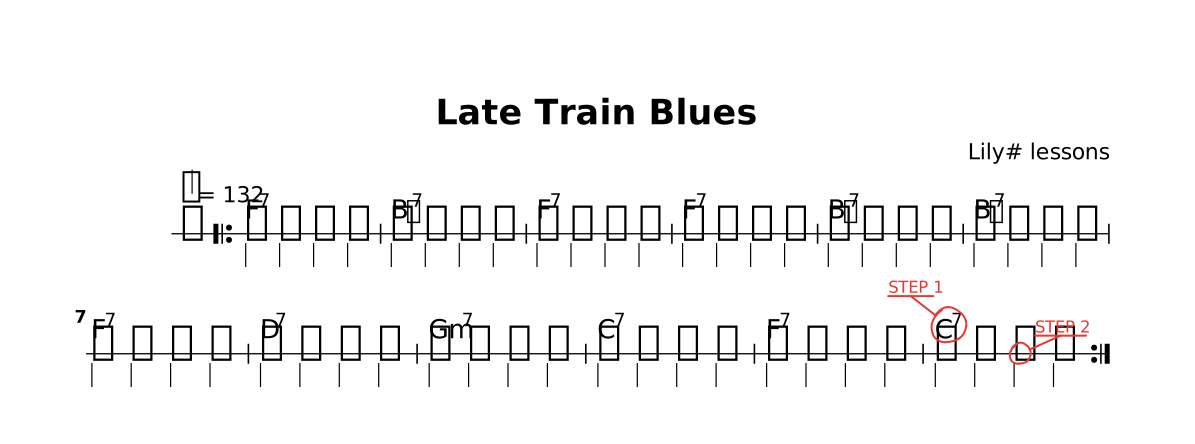
The lesson as it opens: the red rings mark where a step happens.
Try
Change "Petaluma" to "Bravura" or "Leland" · delete the fonts line for LilyPond's own font · remove as lines 1: five lines again.
That is the whole tour. Keep Ctrl+Space close: it knows the rest.
The whole lesson
// Lesson 12 of 12 — A jazz chart
// Preview: Ctrl+K V
//
// A rhythm chart: chord symbols over slashes, on one line. `/` is a beat with no
// pitch, so `/4 / / /` is four of them. `as lines 1` draws a staff on one line, and
// `fonts { music "Petaluma" }` writes it all in a jazz hand — notes, titles, chords.
//
// STEP 1 — the ringed chord ends the tune: make it `Gm7 C7` (two chords share the bar).
// STEP 2 — the ringed slash: type `@` right after it and pick `accent`.

fonts { music "Petaluma" }

title "Late Train Blues"
composer "Lily# lessons"

tempo 132

part comp { }

section A {
  comp {
    /4 / / / | / / / / | / / / / | / / / / |
    / / / / | / / / / | / / / / | / / / / |
    / / / / | / / / / | / / / / | / / /@todo("STEP 2") / |
  }
}

chords harmony {
  section A { F7 | Bb7 | F7 | F7 | Bb7 | Bb7 | F7 | D7 | Gm7 | C7 | F7 | C7@todo("STEP 1") | }
}

form { |: ~A :| }

score {
  chords harmony
  staff comp as lines 1
}

// TRY: change "Petaluma" to "Bravura" or "Leland" · delete the `fonts` line for
// LilyPond's own font · remove `as lines 1`: five lines again.
//
// That is the whole tour. Keep Ctrl+Space close: it knows the rest.