Lesson 10 of 12
Drums
In VS Code, in an empty .lys file: type lesson, press Ctrl+Space and pick lesson-10-drums.
A drum part is written as patterns. drums { } plays its lines together — each a phrase or { … } — and draws them as drummers read: hands on top, feet below. Hover a pattern's name to see its beat.
STEP 1 — In bar 4, after the kick line's }: a space, then Ctrl+Space. The patterns come first. Pick fillTriplet — its phrase appears above.
STEP 2 — The ringed snares are back. In groove, replace back with ghost (Ctrl+Space shows it): a soft extra snare, drawn in parentheses.
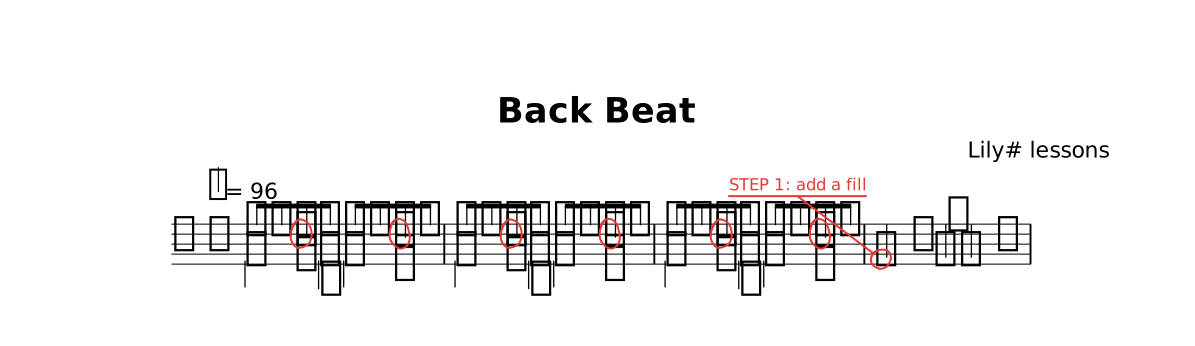
The lesson as it opens: the red rings mark where a step happens.
Try
Change hh8 8 8 8 8 8 8 8 to hh8 8 8 8 8 8 hho hh — every bar that plays hats changes. sn16@parenthesize is a ghost note, acciaccatura { sn16 } sn4 a flam.
The whole lesson
// Lesson 10 of 12 — Drums
// Preview: Ctrl+K V
//
// A drum part is written as patterns. `drums { }` plays its lines together —
// each a `phrase` or `{ … }` — and draws them as drummers read: hands on top,
// feet below. Hover a pattern's name to see its beat.
//
// STEP 1 — in bar 4, after the kick line's `}`: a space, then Ctrl+Space. The
// patterns come first. Pick `fillTriplet` — its `phrase` appears above.
// STEP 2 — the ringed snares are `back`. In `groove`, replace `back` with `ghost`
// (Ctrl+Space shows it): a soft extra snare, drawn in parentheses.

title "Back Beat"
composer "Lily# lessons"

tempo 96

phrase hats   { hh8 8 8 8 8 8 8 8 | }
phrase back   { r4 sn@todo r sn@todo | }
phrase kick   { bd4 r8 bd bd4 r | }
phrase groove { drums { hats back kick } }

part kit {                      // a player
  clef percussion
  section A {                   // the music
    groove groove groove
    drums { { bd4@todo("STEP 1: add a fill") r8 bd bd4 r | } }
  }
}

form { ~A }

score { staff kit }

// TRY: change `hh8 8 8 8 8 8 8 8` to `hh8 8 8 8 8 8 hho hh` — every bar that
// plays `hats` changes. `sn16@parenthesize` is a ghost note,
// `acciaccatura { sn16 } sn4` a flam.
//
// NEXT — type `lesson` on a new line and pick `lesson-11-band`.