Lesson 2 of 12
Notes and octaves
In VS Code, in an empty .lys file: type lesson, press Ctrl+Space and pick lesson-02-notes.
A note is a letter and a length: e4 = E, quarter note.
1 whole · 2 half · 4 quarter · 8 eighth — no number = same as before.
Each note goes to the nearest octave. ' = one octave up, , = down.
Two keys do this for you, with the caret anywhere on a note:
Ctrl+Shift+Up / Down one octave up / down (adds or removes ' and ,)
a digit sets the length, wherever you type it on the note
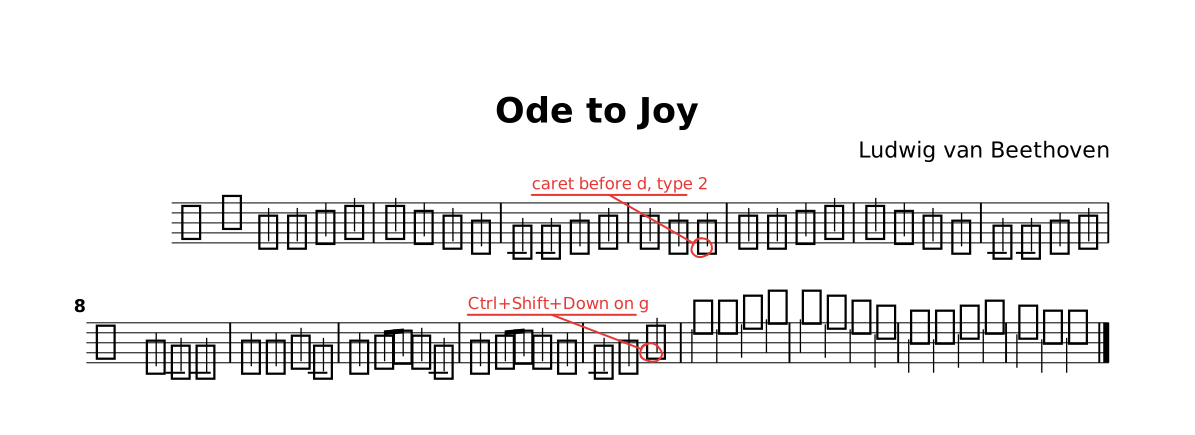
The lesson as it opens: the red rings mark where a step happens.
Try
The red circles in the preview are tasks. Do what each says, then delete its @todo(…). (Write @todo("…") yourself to leave a note.)
The whole lesson
// Lesson 2 of 12 — Notes and octaves
// Preview: Ctrl+K V
//
// A note is a letter and a length: `e4` = E, quarter note.
//   1 whole · 2 half · 4 quarter · 8 eighth — no number = same as before.
// Each note goes to the nearest octave. `'` = one octave up, `,` = down.
//
// Two keys do this for you, with the caret anywhere on a note:
//   Ctrl+Shift+Up / Down   one octave up / down (adds or removes ' and ,)
//   a digit                sets the length, wherever you type it on the note

title "Ode to Joy"
composer "Ludwig van Beethoven"

part melody {                   // a player
  clef treble
  section A {                   // the music
    e4 e f g | g f e d | c c d e | e d d4@todo("caret before d, type 2") |
    e4 e f g | g f e d | c c d e | d c c2 |
    d4 d e c | d e8 f e4 c | d4 e8 f e4 d | c d g2@todo("Ctrl+Shift+Down on g") |
    e'4 e f g | g f e d | c c d e | d c c2 |.           // e' = back up
  }
}

form { ~A }                     // the playing order

score { staff melody }          // what is printed

// TRY: the red circles in the preview are tasks. Do what each says, then
// delete its `@todo(…)`. (Write `@todo("…")` yourself to leave a note.)
//
// NEXT — type `lesson` on a new line and pick `lesson-03-rhythm`.