Lesson 1 of 12
Let the editor teach you
In VS Code, in an empty .lys file: type lesson, press Ctrl+Space and pick lesson-01-completion.
STEP 0 — SEE THE MUSIC. The score opens beside this file by itself and redraws as you type. Not there? Press Ctrl+K, release, then press V (or click the preview icon at the top right of this editor). Click the score, then ▶ to hear it.
Then: Ctrl+Space anywhere lists what you can write there. Red circles in the score show where a step happens. Step done? Delete its @todo(…) (or Ctrl+. on it).
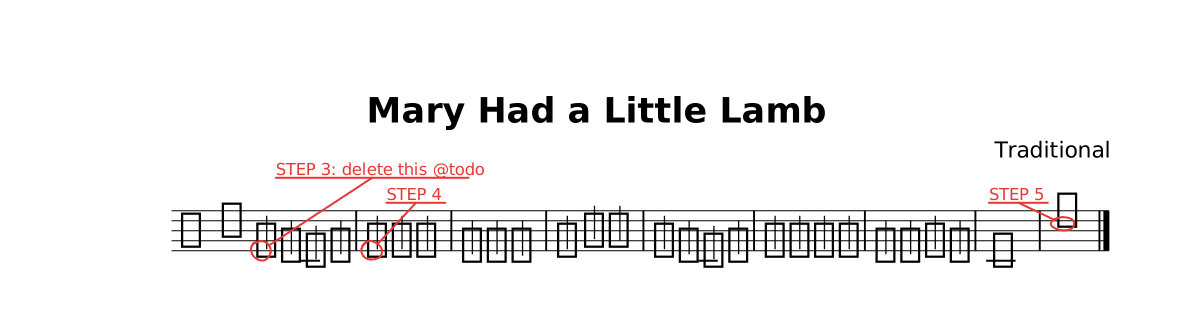
The lesson as it opens: the red rings mark where a step happens.
Steps
- STEP 1 — Ctrl+Space on the empty line below. Pick
key, theng, thenmajor. - STEP 2 — Ctrl+Space on the empty line below. Pick
instrument, thencello. The bass clef appears by itself. Press ▶. - STEP 3 — Delete the first note's
@todo("STEP 3: …"): its red circle goes away. - STEP 4 — Replace
@todo("STEP 4")with@mf: delete it, type@right after thee, and pickmffrom the list. - STEP 5 — Delete
r1@todo("STEP 5"), press Ctrl+Space there, pickCmaj7. - STEP 6 — Change the line below to: form { |: ~A :| } — now it plays twice.
The whole lesson
// Lesson 1 of 12 — Let the editor teach you
//
// STEP 0 — SEE THE MUSIC. The score opens beside this file by itself and
// redraws as you type. Not there? Press Ctrl+K, release, then press V
// (or click the preview icon at the top right of this editor).
// Click the score, then ▶ to hear it.
//
// Then: Ctrl+Space anywhere lists what you can write there.
// Red circles in the score show where a step happens. Step done? Delete its
// `@todo(…)` (or Ctrl+. on it).

title "Mary Had a Little Lamb"
composer "Traditional"

// STEP 1 — Ctrl+Space on the empty line below. Pick `key`, then `g`, then `major`.


part melody {
  // STEP 2 — Ctrl+Space on the empty line below. Pick `instrument`, then `cello`.
  // The bass clef appears by itself. Press ▶.

  // STEP 3 — Delete the first note's `@todo("STEP 3: …")`: its red circle goes away.
  // STEP 4 — Replace `@todo("STEP 4")` with `@mf`: delete it, type `@` right after the `e`,
  // and pick `mf` from the list.
  section A {
    e4@todo("STEP 3: delete this @todo") d c d | e@todo("STEP 4") e e2 |
    d4 d d2 | e4 g g2 |
    e4 d c d | e e e e | d d e d | c1 |
    // STEP 5 — Delete `r1@todo("STEP 5")`, press Ctrl+Space there, pick `Cmaj7`.
    r1@todo("STEP 5") |.
  }
}

// STEP 6 — Change the line below to:  form { |: ~A :| }   — now it plays twice.
form { ~A }

score {
  staff melody
}

// NEXT — type `lesson` on a new line and pick `lesson-02-notes`.