This page is about chords you play: the notes on the staff, three ways to write them,
and how Lily# checks that a player can hold them. What a chord shows over the music —
its name, its diagram, a chords row — is on
Chord names and diagrams.
| Write | When | Section |
|---|---|---|
<f a c>4 | you know the notes, or completion writes them | 1, 2 |
chord(F)4 | you know the name; it plays the chord's notes, close | 3 |
chord(F 133211)4 | a guitarist's shape: those strings, those frets | 3 |
01
Notes in angle brackets
A chord is its notes between < and >, with one
duration after the >: <c e g>4. Everything a note takes
after its duration — ties, slurs, dynamics, articulations — a chord takes too.
- Octaves: a chord is read as its first note. The first note takes the octave
nearest the note before, as a single note would. Each later note stacks at or above it,
so
<c e g>and<c g e>are the same chord. The note after the chord is read from that first note. To repeat the bottom note an octave up, mark it:<c e g c'>. A plaincthere would be the same C again. - Degrees:
<1 3 5>is the key's tonic triad and<2 4 6>its ii, spelled from the key signature. A letter and degrees mix:<c 3 5>. - Repeats:
qrepeats the last chord (q'an octave up); a bare duration repeats it at a new length (<f a c>4 4).

Show the whole file
// A chord is notes in angle brackets, one duration after the >. Degrees of the key write
// the same chords; q repeats the last chord, and a bare duration repeats it at a new length.
time 4/4
key c major
part piano { clef treble }
section A {
  piano { <c' e g>2 <1 3 5>2 | <2 4 6>4 q q2 | <f a c>4 4 <g b d f>2 | <c e g c'>1 | }
}
form { ~A }
score { staff piano }
The full octave rules, with the marks on later notes that spread a chord
out, are in the manual's Notes, rests, chords. To print the
chord's name over it, add a bare @chord — see
Names from the notes.
02
Let completion spell it
In VS Code you rarely type a chord's notes yourself. In music, press
Ctrl+Space and the list offers the key's own chords: in C major,
C writes <c e g> and Dm7 (also listed as
IIm7) writes <d f a c>. For a chord from outside the key, type its
symbol in note names and pick it: besm7 offers <bes des f aes>.
The notes go in bare, so the octave follows the music around them.
In a violin, viola, cello or double-bass part the same rows write a double stop:
the chord's first two notes (Cmaj7 → <c e>), since a bow sounds
two strings at once (below).
Lesson 1 of the lessons has you do it on a cello. Every other typing aid is on the editor page.
03
By name or by shape
Instead of its notes, write the chord's name, or a guitarist's shape (one
character per string, low string first: x32010 is C). One rule covers every
spelling: the word says what is seen — chord shows the name,
diagram the fret diagram — and with no @ the chord sounds.
| Written | Prints | Sounds |
|---|---|---|
chord(F)4 | F | F A C, close |
chord(F 133211)4 | F over its diagram | that shape's strings |
chord(x32010)4 | C, read off the shape, over its diagram | that shape's strings |
diagram(133211)4 | the diagram alone | that shape's strings |
The same words with @ — c1@chord(F), c1@diagram(133211) —
only mark the note they are on; they are on Chord names and diagrams.
- The notes: each string's open pitch plus its fret, on the part's instrument (else
the guitar), each with its string number, so a
tabshows exactly the shape.chord(C x32013)1on a guitar is C3 E3 G3 C4 G4. They are absolute — octave marks after the)are an error; play it higher on the neck instead — and the note after the item is read from its lowest note. - No shape:
chord(G)plays the chord's notes close, G B D, its root by middle C as the staff draws it (by a bass staff's foot on a bass staff), in the instrument's range — on any part, a guitar's too — and draws no diagram.diagram(G)plays and draws its usual shape: the instrument's, else the guitar's. A shape written badly, or only for another instrument, warns (LYS1040) and keeps its time as a spacer. - The tail is a chord's: a duration, dots, ties, slurs, beams, articulations,
dynamics; a bare duration or
qrepeats it. - Strum after strum: write every strum the same. The name and the diagram stand where the chord changes, and again at the head of each system, and the repeats take no room.
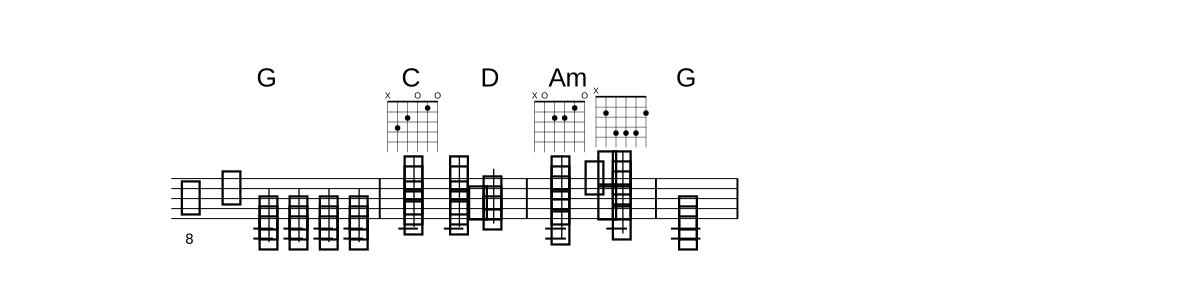
Show the whole file
// chord(...) plays a chord and prints its name; with no shape it plays the chord's notes
// close (G B D), and strum after strum the name and diagram stand only where the chord changes.
// chord(x32010) prints the name the shape spells; diagram(...) plays it under the picture alone.
time 4/4
part gt { instrument guitar }
section A {
  gt {
    chord(G)4 chord(G)4 chord(G)4 chord(G)4 | chord(C x32010)4 chord(C x32010)4 chord(D)2 |
    chord(x02210)2 diagram(x24442)2 | chord(G)1 |
  }
}
form { ~A }
score { staff gt }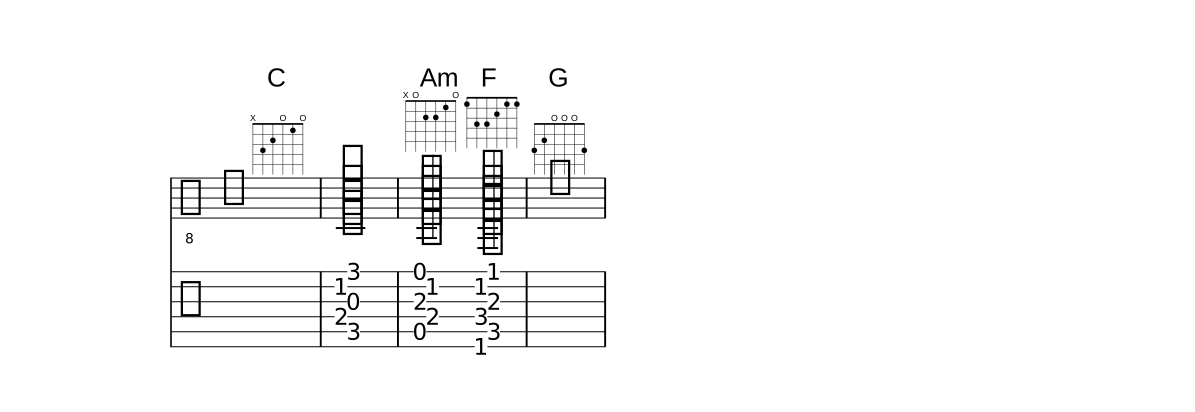
Show the whole file
// chord(NAME SHAPE) WRITES the shape's notes: each string's open pitch plus its fret,
// with its string number, so the tab shows the same shape, and prints the name over its
// diagram; diagram(NAME SHAPE) the same notes under the diagram alone. A chord name
// belongs to the beat, so a rest or a spacer takes one.
time 4/4
part gt { instrument guitar }
section A {
  gt {
    s1@chord(C x32010) | diagram(C x32013)1 |
    chord(Am x02210)2 chord(F 133211)2 | r1@chord(G 320003) |
  }
}
form { ~A }
score { staff gt  tab gt }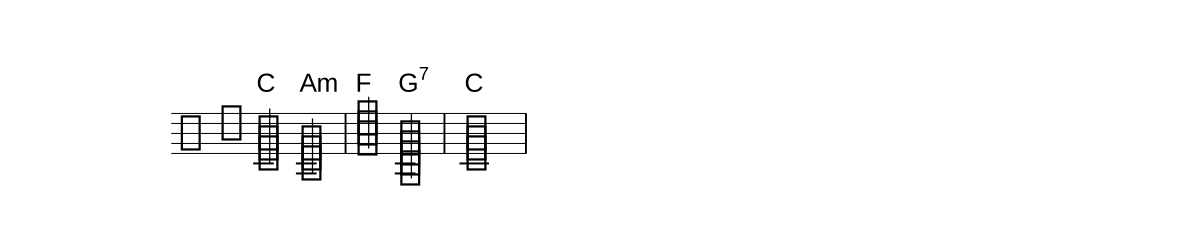
Show the whole file
// On a piano, chord(...) with no shape plays the chord close, by middle C, and prints its name.
time 4/4
part piano { clef treble }
section A {
  piano { chord(C)2 chord(Am)2 | chord(F)2 chord(G7)2 | chord(C)1 | }
}
form { ~A }
score { staff piano }
In the editor
- Ctrl+Shift+Up / Down on an item walks the other shapes of the
same chord, and sounds each one; from
chord(G), Down writes the usual shape. - Found a shape by ear? Write
chord(x02210)4and the page prints its name, Am. Or hoverdiagram(x02210): it says this shape is Am, and the quick fix (Ctrl+.) writes the name in. - Right-click an item → Convert to Chord Notes <…> writes it out as the
notes it plays, octave marks and string numbers included —
diagram(133211)4becomes<f,\6 c\5 f'\4 a'\3 c'\2 f''\1>4, and achord(…)item keeps its name as a bare@chord(chord(F)1→<f a c>1@chord). The file must sound the same afterwards, or nothing changes.
04
Rolled and broken chords
@arpeggiorolls a chord: the wavy line before it.@arpeggio(bracket)draws a bracket instead, to play the notes together.<< … >>writes the broken chord out. Its notes play in turn and share the group's duration:<< c e g c' >>2is four eighths. A share that is no plain note value becomes a tuplet by itself. Octaves stack as in a chord. A bare number inside is a degree, never a duration:<< c 3 5 8 >>. A member may be a chord or a rest.- A shape inside is spread:
<< diagram(C x32010) >>2plays the five strings in turn, lowest first, under 5:4, and draws the diagram once, over the first note. Mixed with other members (<< c diagram(G 320003) e >>) its notes take their places in the sequence.

Show the whole file
// @arpeggio rolls a chord; << >> writes a broken chord out, its notes sharing the time
// (a bare number inside is a degree of the key). A member may be a chord itself.
time 4/4
part piano { clef treble }
section A {
  piano { <c' e g c'>2@arpeggio <c e g c'>2 | << c e g c' >>2 << c 3 5 8 >>2 | << <c e> g <c e> g >>1 | }
}
form { ~A }
score { staff piano }
05
On a fretted instrument
A guitar, bass, ukulele or banjo part can hold only what one hand can fret: one note per string, all within four frets. Lily# finds that fingering itself — no crossed strings, the lowest position, the fewest fingers — and uses it four ways.
- A bare
@diagramon a chord draws its own notes as fretted:<g b d' f'>1@diagramdrawsxx5431, and follows the notes when you edit them. The.lytwin draws the same shape. On a single note it draws where that note is held:c'1@diagramisxxxx1x, and Ctrl+Shift+Up walks the other places (xxx5xx,xx-10-xxx, …). - Right-click a
<…>chord → Add Guitar Diagram writes that shape out:<g b d' f'>1@diagram(xx5431). With the caret on the shape, Ctrl+Shift+Up / Down walks the other ways to hold the same notes (fingering 2 of 3:x-10-976x); the notes never change. On a bare@diagram, which already draws the first, Down writes that one out; Up at the first takes the shape away again, and the diagram follows the notes once more. On a single note of a guitar part the light bulb (Ctrl+.) offers it too. - Right-click a
<…>chord → Convert to Chord Symbol chord(…) makes it an item again:<f,\6 c\5 f'\4 a'\3 c'\2 f''\1>1@chord(F)→chord(F 133211)1. The name is its@chord(NAME), else read off its notes;chord(NAME)alone when its close voicing is the notes, else with the shape. The file must sound the same, or nothing changes. - A written diagram that no longer sounds its chord is warned (LYS1057) — the notes were edited after the shape was written. The quick fix writes the chord's own shape. A capo or a transposing part, every note moved alike, is not a difference.
- A chord no hand can hold is warned (LYS1055). The warning names a voicing of the same notes that can be held, written as a diagram writes it.
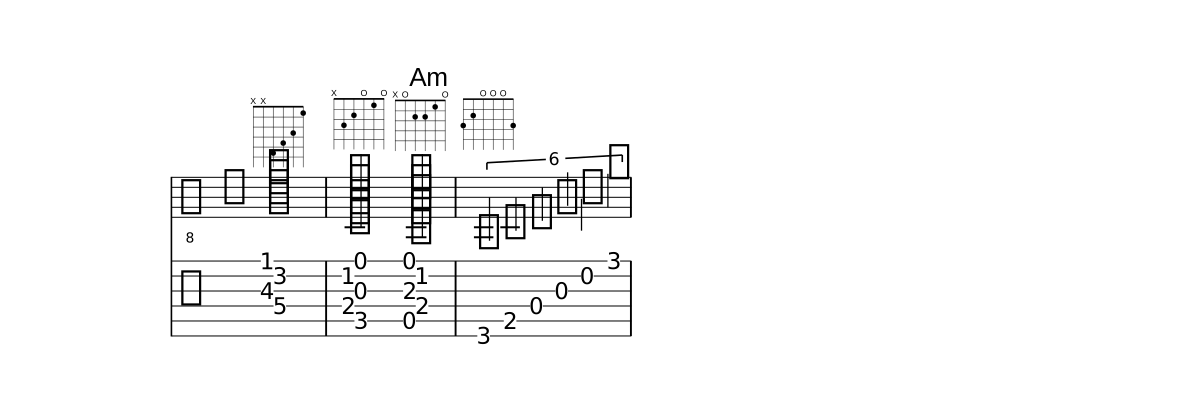
Show the whole file
// On a guitar, a bare @diagram draws a <...> chord's own notes as they are fretted.
// diagram(NAME SHAPE) writes a shape's notes and draws it; in << >> its strings are
// played in turn, lowest first.
octave absolute
time 4/4
part gt { instrument guitar }
section A {
  gt { <g b d' f'>1@diagram | diagram(C x32010)2 chord(Am x02210)2 | << diagram(G 320003) >>1 | }
}
form { ~A }
score { staff gt tab gt }| On a guitar | The compiler says |
|---|---|
<e f fis g>1 | this chord (E3 F3 F#3 G3) cannot be fingered: no string for each note within a hand's reach (4 frets) - a voicing of its notes a player can hold: E3 F#3 G3 F4 (x7406x), the lowest note kept, the others moved by an octave |
Ranges, open strings and the tuning are the part's own: instrument ukulele
checks against the ukulele's re-entrant G, tuning guitarDropD against the
dropped D. Which instrument a diagram is drawn for, every-chord diagrams and the capo are on
Chord names and diagrams.
06
On a bowed string
A bow sounds two strings at once, so a violin, viola, cello or double-bass chord is a double stop. Its two notes must lie on neighbouring strings, within the hand's reach. Anything else is warned (LYS1055):
| On a cello | The compiler says |
|---|---|
<c g e'>2 | this chord (C3 G3 E4) cannot be bowed at once: a bowed string sounds two strings together, not 3 - keep two of its notes (a double stop), or break the chord, the low notes first |
<c a'>1 | this chord (C3 A4) cannot be bowed at once: its two notes do not lie on neighbouring strings within the hand's reach (5 semitones) - move one by an octave, or choose another pair of the chord's notes |
A three- or four-note chord written as a quick roll is still a fair thing to ask for.
Write it as a << >> group, the low notes
first, and nothing is warned.
07
Ask the AI which voicings
Composing in Copilot's chat, the AI can ask Lily# which voicings a player can hold
(#chordVoicings). It names a chord symbol, an instrument and a register, and gets
back the voicings, commonest first, as Lily# chords with their diagrams:
<c g bes ees' g'> x35343 for Cm7 on a guitar. A bowed string's
answers are double stops. What the AI then proposes is compiled like anything you write,
so a chord no one can hold still shows its LYS1055 warning.
How composing in the chat works is on the editor page.